How to Import a Notts FHS Database into MS Access 2000
Because MS Access writes temporary files to the database,
you cannot run the file from the CD, but need to copy it to your hard disk first.
With Access and the Notts CD's you do not need to create a new database, just Import from the CD in its existing .DBF format.
So open any Access database you have...or if you do not have one
then create one. (To create .. click on Blank Access database as below and
follow instructions .. it will ask you to give it a name )
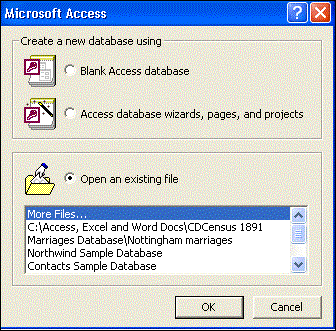
When open …you should see a window like the one below.
Click on File...(At the top left hand corner of the page)
A drop down menu will now appear…

Move cursor down to … Get External Data ... and drag mouse along to Import
..
A ‘Pop up’ box will now show as follows......
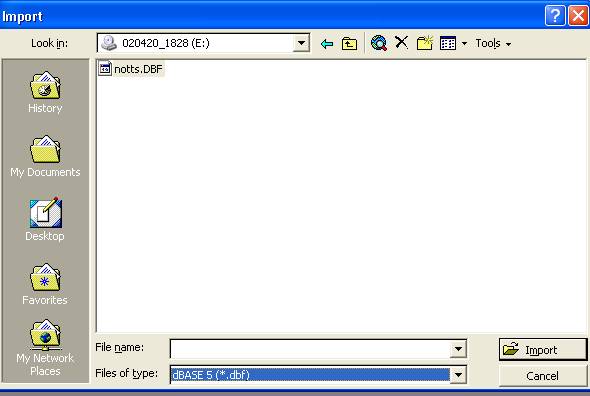
Where it says ‘Look in’ at the top of the Box,
Click on the arrow until your find your CD drive letter...
AT the bottom where it says ‘Files of Type’
Click on the little arrow until you find dBase5(*.dbf)
In the middle of the ‘Pop Up’ box you should see the file you are wanting to import.
Click on it…(In this example it is the notts.DBF i.e Baptisms)
Click on Import at the bottom of the box.
When complete it will show the following box…
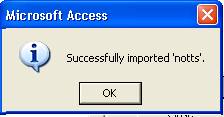
Click on OK and close the Import box.
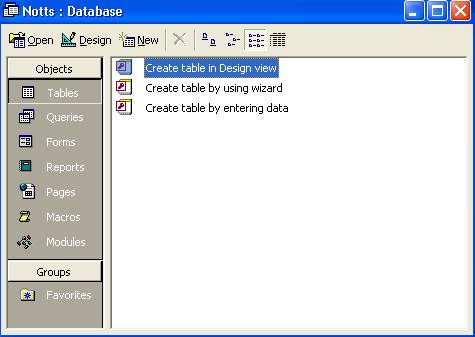
You should now be looking at the following box in Access
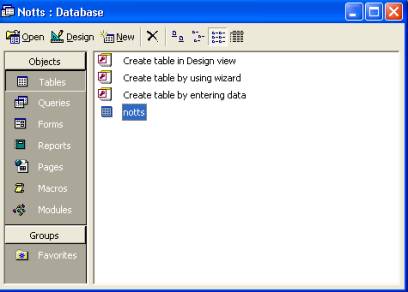
You will see that the word
 in the Objects
column is depressed..
in the Objects
column is depressed..
This means we are looking at the ‘Tables’ in this Database.
In the middle you will also see that you now have a file .
the 4th one down in this example is called ‘notts’
The ‘Import’ has automatically create a Table in Access for you...
with all the correct columns..... because the CD came as a .DBF file format.
As you repeat this with the other CD’s, they will all add on to this file.
If you wish you can put them all together in one Database file. The choice
is yours.
If you double click on this ‘notts’ Table it will bring up all the DATA
see example box here.
| PLACE | DATE | BORN | CNAME | FNAME | MNAME | FSURN | MSURN | ABODE | PROF |
| NEC | 13/06/1848 | 29/04/1848 | Edward L Disney | Henry Austin | Renee Theresa | TURNER | Chatham St | Capt Royal Artillery | |
| NEC | 02/07/1848 | Ann Eliza | Thomas James | Ann | BAKER | Steam Mill Miller | |||
| NEC | 24/07/1848 | Fredrick | Joseph | Mary | CUCKSON | Farndon Row | Labourer | ||
| NEC | 13/08/1848 | William | George | Sarah | BROWN | Parliament St | Labourer | ||
| NEC | 25/09/1848 | Jane | Richard | Sarah | LYNN | Chatham St | Grocer | ||
| NEC | 18/08/1850 | Thomas Chappell | Anna | WRIGHT | Mill Gate |
That is OK….. but you now need to know how to search the DATABASE TABLE.